

facebook page Connexion on zennobox v5.26

valteau

Client
Joined
Jul 6, 2018
Messages
133
Reaction score
3
Points
18
fb_PAge.PNG


I have a problem to display the post and other content of any facebook page on zennobox v5.26. It displays this to me by clicking like to subscribe and follow the news.

I click on home and nothing is displayed. I don't use a proxy because I connect normally like that. i try without and with proxy (account different) and its the same problem.

Do you see the concern @VladZen .


fb_PAge.PNG
 

VladZen

Administrator
Staff member
Joined
Nov 5, 2014
Messages
22,829
Reaction score
6,040
Points
113
View attachment 35320

I have a problem to display the post and other content of any facebook page on zennobox v5.26. It displays this to me by clicking like to subscribe and follow the news.

I click on home and nothing is displayed. I don't use a proxy because I connect normally like that. i try without and with proxy (account different) and its the same problem.

Do you see the concern @VladZen .
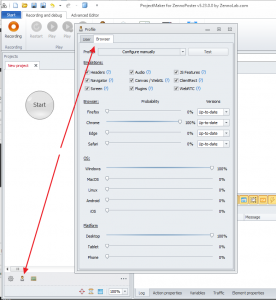

View attachment 35319
What browser parameters do you set in browser profile settings?
Profile_emulation.png
 

valteau

Client
Joined
Jul 6, 2018
Messages
133
Reaction score
3
Points
18
fb_page1.PNG


Never touch
 

VladZen

Administrator
Staff member
Joined
Nov 5, 2014
Messages
22,829
Reaction score
6,040
Points
113
Don't you disable pictures, flash/java/silverlilght plugins, javascript or flash in browser settings?
 

valteau

Client
Joined
Jul 6, 2018
Messages
133
Reaction score
3
Points
18
No you can see on my screenshot but maybe it's because i do too much time scrolling a little fast.so facebook block during a moment all the content...
 

valteau

Client
Joined
Jul 6, 2018
Messages
133
Reaction score
3
Points
18
no I waited a day and it still doesn't work. I have a facebook banner "update your firefox browser". why it's happen.. ? I did the last update of Zennoposter v5.26... how can i have a firefox navigator who works correctly on facebook. thanks @VladZen
 

Aronax

Client
Joined
Jan 29, 2015
Messages
213
Reaction score
64
Points
28
Maybe you should change your user agent to something which is up-to-date...like chrome 71 or firefox 64. Don't know if it'll work but it's worth trying (if you haven't already tried this).
 

VladZen

Administrator
Staff member
Joined
Nov 5, 2014
Messages
22,829
Reaction score
6,040
Points
113
no I waited a day and it still doesn't work. I have a facebook banner "update your firefox browser". why it's happen.. ? I did the last update of Zennoposter v5.26... how can i have a firefox navigator who works correctly on facebook. thanks @VladZen
Try generating other user agents on profile. Not default, better select manually and generate up-to-date browser versions.
 

valteau

Client
Joined
Jul 6, 2018
Messages
133
Reaction score
3
Points
18
Can you explain me how do you do that ? it's not clear for me what i need to do exactly. Thanks @VladZen
 

VladZen

Administrator
Staff member
Joined
Nov 5, 2014
Messages
22,829
Reaction score
6,040
Points
113

Users Who Are Viewing This Thread (Total: 1, Members: 0, Guests: 1)