

How to click on file upload button only available on hover

richardroe

Новичок
Joined
Feb 18, 2019
Messages
22
Reaction score
0
Points
1
Hey does anyone know the best way to click on a button that only appears after the mouse hovers over it? I tried using mouse emulation based on coordinates, clicking after search by picture, and even click/onclick/onfocus/onmouseover through the action designer but none of that seemed to work.
 

VladZen

Administrator
Staff member
Joined
Nov 5, 2014
Messages
22,829
Reaction score
6,040
Points
113
You should give us an example where we can see this button to play with it.
 

morpheus93

Client
Joined
Jan 25, 2012
Messages
1,068
Reaction score
257
Points
83
@VladZen Same problem here with the login button on
C#:
gmx.net
Worked well with ZP for a long time but now it seems they have changed something and it only works correctly if I manually click on it in PM (while debugging the project). If I use (the formerly used) "standard" click it redirects to their own "Search Page" and avoid therefor the login to the account. I thinks it's for protection against bots. Tried it with mouse emulation from C# but that works only for a while and then it stops...
Maybe you have and idea to help me out?

Thank you :-)
 

VladZen

Administrator
Staff member
Joined
Nov 5, 2014
Messages
22,829
Reaction score
6,040
Points
113
@VladZen Same problem here with the login button on
C#:
gmx.net
Worked well with ZP for a long time but now it seems they have changed something and it only works correctly if I manually click on it in PM (while debugging the project). If I use (the formerly used) "standard" click it redirects to their own "Search Page" and avoid therefor the login to the account. I thinks it's for protection against bots. Tried it with mouse emulation from C# but that works only for a while and then it stops...
Maybe you have and idea to help me out?

Thank you :-)
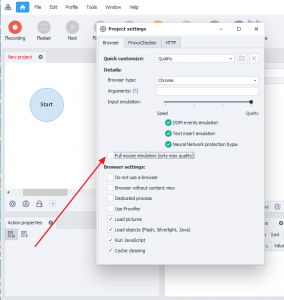
Try disabling full mouse emulation
Full mouse emulation.png
 
  • Thank you
Reactions: morpheus93

morpheus93

Client
Joined
Jan 25, 2012
Messages
1,068
Reaction score
257
Points
83
Try disabling full mouse emulation
View attachment 52058
Really DISabling? Okay, I will try :-)

Currently added a "Search by picture"-click. It seems to work most of the time. But I read that the "Search by picture"-feature is not recommended to use?
 

VladZen

Administrator
Staff member
Joined
Nov 5, 2014
Messages
22,829
Reaction score
6,040
Points
113

morpheus93

Client
Joined
Jan 25, 2012
Messages
1,068
Reaction score
257
Points
83
yes what's so surprising
For me it's more logic if a button can only be clicked if the mouse is over to ENable mouse-emulation ;-)

But I tried it and now it works with "Full mouse-emu" disabled and "Input emu" set to the 3rd level (w/o Neuronal N. bypass).

Thank you!
 

Users Who Are Viewing This Thread (Total: 1, Members: 0, Guests: 1)