


How to control size of text in notes?

KitKat21

Client
Joined
May 2, 2017
Messages
268
Reaction score
192
Points
43
Hi guys,

I have a question.

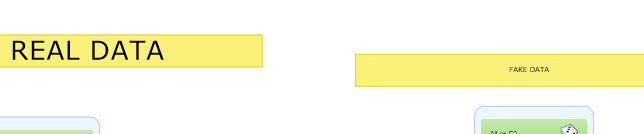
Sometimes when I make a note, the text comes out huge or sometimes regular/small.
How can I control the text size? It's really useful to sometimes have big text but I can't seem to make it big on demand.

See example:

Thanks!
 

Solus

Client
Joined
Apr 14, 2014
Messages
378
Reaction score
120
Points
43
Use Caps Lock. Seems that's the only way to make some big text.
And if it's cominig out huge, for some unknown reasons, so it looks like a bug


ps: sorry for my bad english i'm just trying to not use a Google Translate :-)
 

KitKat21

Client
Joined
May 2, 2017
Messages
268
Reaction score
192
Points
43
Use Caps Lock. Seems that's the only way to make some big text.
And if it's cominig out huge, for some unknown reasons, so it looks like a bug


ps: sorry for my bad english i'm just trying to not use a Google Translate :-)
Спасибо)

I just found if I select the text and then use mouse wheel to zoom out while text is selected it gets big. The further I zoom out the bigger it gets.
Quite cool.
 

Solus

Client
Joined
Apr 14, 2014
Messages
378
Reaction score
120
Points
43
Wow cool. but it's not working with my version.
Anyway you have found an answer.
 

Users Who Are Viewing This Thread (Total: 1, Members: 0, Guests: 1)