




- Регистрация
- 25.01.2012
- Сообщения
- 1 039
- Благодарностей
- 237
- Баллы
- 63
Profile Browser settings compared to emulation via step
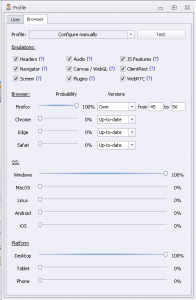
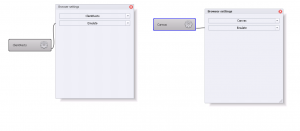
What is the difference between the "Profile-Browser-Configure manually" settings and the action block "Browser settings" where I can also configure the emulation of Canvas, ClientRect and so on?
So if I check all the settings in the static block "Profile" under "Browser-Configure manually-Emulations" is it necessary to make additional emulation settings using a browser settings cube?
And what are the recommended settings in "Profile-Browser-Configure manually-Emulations", just check all or just a few of them?
What is the difference between the "Profile-Browser-Configure manually" settings and the action block "Browser settings" where I can also configure the emulation of Canvas, ClientRect and so on?
So if I check all the settings in the static block "Profile" under "Browser-Configure manually-Emulations" is it necessary to make additional emulation settings using a browser settings cube?
And what are the recommended settings in "Profile-Browser-Configure manually-Emulations", just check all or just a few of them?
Вложения
-
 18,7 КБ Просмотры: 364
 -
 19,2 КБ Просмотры: 397

