

Type is not detected - Google words

kadensevex

Новичок
Joined
Jan 25, 2017
Messages
10
Reaction score
2
Points
3
I added custom size to GoogleWorlds module but it didn't help.
2017-02-17.png


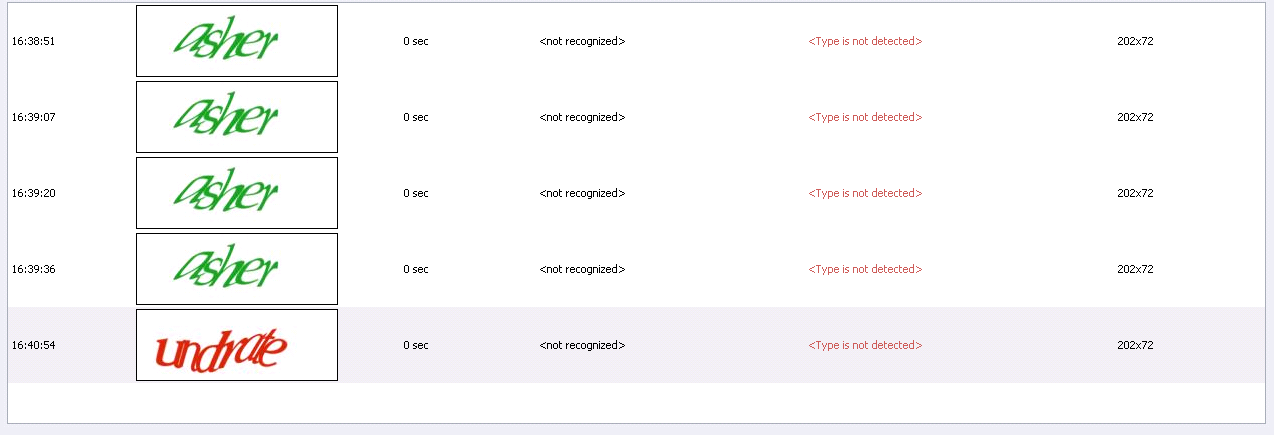
I'm getting Type is not detected.
Settings: Recognize automatically if probability is not less than: 0%
Diagnostic report attached, what am I doing wrong?
 

Attachments

copper12

Client
Joined
Nov 26, 2016
Messages
1,111
Reaction score
260
Points
63
Hello,
In CapMonster 2 choose Modules and find there GoogleWords module, then write down in Size of Images custom size (202x72). Also in Project Maker write down in Module Settings CapMonsterModule=ZennoLab.GoogleWords
 

Attachments

kadensevex

Новичок
Joined
Jan 25, 2017
Messages
10
Reaction score
2
Points
3
What project maker do you mean?
Custom size is set as you wrote, but nothing has changed.
2017-02-21.png
 

copper12

Client
Joined
Nov 26, 2016
Messages
1,111
Reaction score
260
Points
63
Can you explain why on the captcha image black frame appeared? This frame adds to size of captcha 1 pixel per each side. Try to get rid of this frame and send capthas without it.
 

kadensevex

Новичок
Joined
Jan 25, 2017
Messages
10
Reaction score
2
Points
3
this is how the captcha looks, that's why I added different size. I can't remove the border. But recognition is not the issue. CM2 is not recognizing type of captcha, as you see...
 

Attachments

VladZen

Administrator
Staff member
Joined
Nov 5, 2014
Messages
22,794
Reaction score
6,022
Points
113
There shouldn't be border frame in captcha image.
What program do you send captcha from and how do you parse captcha from website?
 

kadensevex

Новичок
Joined
Jan 25, 2017
Messages
10
Reaction score
2
Points
3
I'm using xneolinks. xneolinks is saving images and send them to cm2. I don;t think they add anything, this is how the browser sees the captcha.
But it's not the point. Any additional pixel shouldn't break recognition as far as I added correct image size.
I'm not complaining about captcha recognition, for now, Cm2 just can't don't recognize the type correctly.
 

VladZen

Administrator
Staff member
Joined
Nov 5, 2014
Messages
22,794
Reaction score
6,022
Points
113
I'm using xneolinks. xneolinks is saving images and send them to cm2. I don;t think they add anything, this is how the browser sees the captcha.
But it's not the point. Any additional pixel shouldn't break recognition as far as I added correct image size.
I'm not complaining about captcha recognition, for now, Cm2 just can't don't recognize the type correctly.
The border is very important for image recognition algorithms.
Does xneolinks allow to add some additional parameters for sending captcha? If yes, you should add the following: CapMonsterModule=ZennoLab.GoogleWords
 

kadensevex

Новичок
Joined
Jan 25, 2017
Messages
10
Reaction score
2
Points
3
I can't add any additional parameters when harvesting. But as I understand custom size should recognize the type.
 

copper12

Client
Joined
Nov 26, 2016
Messages
1,111
Reaction score
260
Points
63
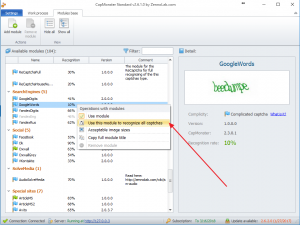
You can enable GoogleWords module by this way (See Screenshot)
 

Attachments

kadensevex

Новичок
Joined
Jan 25, 2017
Messages
10
Reaction score
2
Points
3
@copper12 This solution works, thank you! Harvesting Google I can set it as you showed and this is enough for me. Greetings
 

Users Who Are Viewing This Thread (Total: 1, Members: 0, Guests: 1)