Bugs in version 5.22.0.0

  • Автор темы Автор темы Deemer84
  • Дата начала Дата начала

Deemer84

Administrator
Регистрация
10.05.2017
Сообщения
410
Реакции
84
Баллы
28
Bugs, errors and problems in new version 5.22.0.0.
 
Hi,
I'm using the Page Parsing feature and it works great.

However, I've put the Range as "all", and I'm saving the results To Variable instead of To List, but when I write the variable to file, it only takes the first line.

If I choose To List, it takes everything.

Please help.

Thanks!
 
Hey !

There is a bug with lists.

When you add content from "Text processing" to a list with "To list", it starts from 0 and it's impossible to get lines 0 ...


EXAMPLE : I needed to add 20 values to the list, so it added from 0 to 19. At this moment everything is fine.

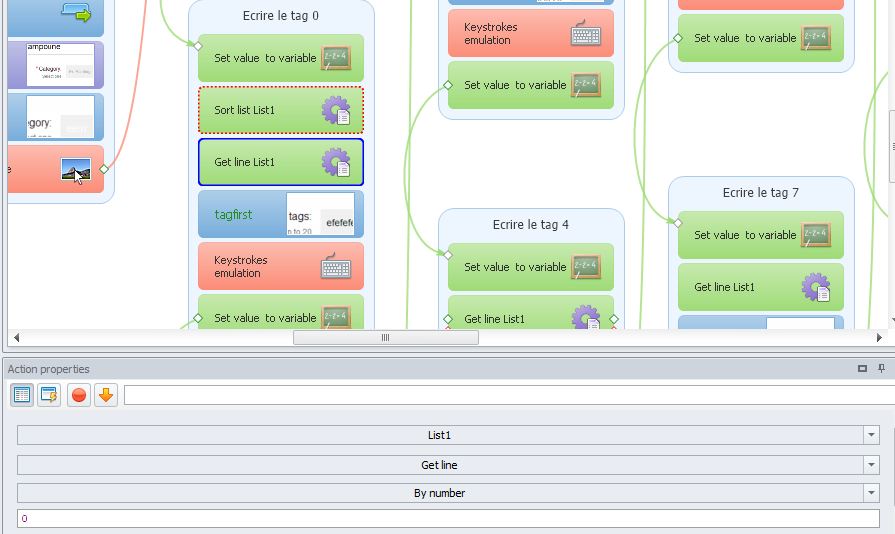
But when I tried to get the content from line 0 here is what happens : (SCREENSHOT)

frfrfrh.jpg


1. If I try to use "By number" and then I write 0, it will automatically replace it by "First".

2. Then if I use "First", it will get line 1, never line 0.

-
So it's quite boring. To make it work, I needed to :
- select "Delete line after take"
- Add a "Delete lines" block to delete all the lines except the line I needed to get
- Then if there is only 1 value in the list and it's in line 0, this time it will take it with "First" option ... :am:

-
In this case I have the same number of values to add in the list every time.
But what if I have 20 values the first time and 29 the second time ? My solution will no longer work so the problem is still there ... !

-
Could you please do something to resolve this problem ?

Thank you for your time.
 
Hey !

There is a bug with lists.

When you add content from "Text processing" to a list with "To list", it starts from 0 and it's impossible to get lines 0 ...


EXAMPLE : I needed to add 20 values to the list, so it added from 0 to 19. At this moment everything is fine.

But when I tried to get the content from line 0 here is what happens : (SCREENSHOT)

frfrfrh.jpg


1. If I try to use "By number" and then I write 0, it will automatically replace it by "First".

2. Then if I use "First", it will get line 1, never line 0.

-
So it's quite boring. To make it work, I needed to :
- select "Delete line after take"
- Add a "Delete lines" block to delete all the lines except the line I needed to get
- Then if there is only 1 value in the list and it's in line 0, this time it will take it with "First" option ... :am:

-
In this case I have the same number of values to add in the list every time.
But what if I have 20 values the first time and 29 the second time ? My solution will no longer work so the problem is still there ... !

-
Could you please do something to resolve this problem ?

Thank you for your time.
What error do you get in execution log when trying to get 0 line by number?
PM_log.png
 

Кто просматривает тему: (Всего: 0, Пользователи: 0, Гости: 0)