Click emulation differences.

  • Автор темы Автор темы lokiys
  • Дата начала Дата начала

lokiys

Moderator
Регистрация
01.02.2012
Сообщения
4 922
Реакции
1 206
Баллы
113
There are so many different methods and ways how to emulate clicks that I'm totally confused about what to use. So let's start with some questions.
What interest me the most are:

Move and click a number 1:

C#:
Развернуть Свернуть Копировать
he = tab.FindElementByAttribute("a", "class", @"sn-suggest-link", "text", 0);
if(!he.IsVoid)
{
    tab.FullEmulationMouseMoveToHtmlElement(he);
    instance.WaitFieldEmulationDelay();
    he.Focus();
    // Get random emulation delay
    emulationDelay = r.Next(enterDelayStart, enterDelayEnd);
    tab.FullEmulationMouseClick("left", "click");
    // Field delay
    Thread.Sleep(r.Next(fieldDelayStart, fieldDelayEnd));
}

Move and click a number 2:

C#:
Развернуть Свернуть Копировать
he = tab.FindElementByAttribute("button", "id", @"signUpButton", "text", 0);
if(!he.IsVoid)
{
    he.Click();
    instance.WaitFieldEmulationDelay();
}

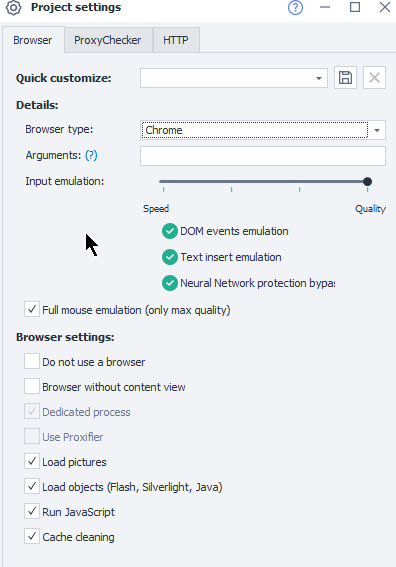
Which Click emulation will be better. ? Taking into account that I have a Full mouse emulation setting enabled.
70366


If possible I would like to know about every other method which one is better, same or worst than others.
 
These project settings only affect the cubes. In C#, a click occurs only as the programmer wrote it.

This is not what I asked. If You look in the assembly there are like 3-4 different ways how I can make click emulations, same as with keystroke emulations I want to get it perfectly clear what is the difference and which one to use better.
As I had some tasks previously where one click emulation works differently from another, and one does not work at all on some sites and other works, so I'm guessing there are some differences under the hood, I want to know what.


You are not right about cubes.
Using this code with Full mouse emulation checkbox enabled, emulates mouse move as well, just same like from the cube.
C#:
Развернуть Свернуть Копировать
he = tab.FindElementByAttribute("button", "id", @"signUpButton", "text", 0);
if(!he.IsVoid)
{
    he.Click();
    instance.WaitFieldEmulationDelay();
}
 
  • Спасибо
Реакции: Pierre Paul Jacques
Well, maybe.... I haven't used this check mark in the project settings for a long time.
If we talk about the reliability of the click, then these two methods are the most reliable.

C#:
Развернуть Свернуть Копировать
instance.Click(1,1 ,2 ,2 , "Left", "Normal");
instance.ActiveTab.FullEmulationMouseClick("left","click");
 
VladZen please take Your time, but I really would like to hear an answer from developers and with a little more detailed explanation about each method, because as I told I have seen that those methods work differently on the page.
 
  • Спасибо
Реакции: Pierre Paul Jacques
In the first case, you emulate mouse move and click manually buy yourself. By this, you can specify any behavior you wish.
In the second, mouse movement will be added automatically for simple click on element
if you enabled FullMouseEmulation option in project settings. This is more convenient to normal user who does not have programming skills.
You decide which is better for you.

P.S. lokiys please note that user mentioning on forum does not work currently. you won't receive notification.
 
In the first case, you emulate mouse move and click manually buy yourself. By this, you can specify any behavior you wish.
In the second, random mouse movement will be added automatically for simple click on element
if you enabled FullMouseEmulation option in project settings. This is more convenient to normal user who does not have programming skills.
You decide which is better for you.

P.S. lokiys please note that user mentioning on forum does not work currently. you won't receive notification.

Mate, I just posted those two methods as an example. I understand that cube is for without c# lol.
I told them that two methods and let them show me.

C#:
Развернуть Свернуть Копировать
1. tab.FullEmulationMouseClick("left", "click");
2. instance.Click(xMin, xMax, yMin, yMax, "Left", "Normal");

Those two methods work differently on the page.
Some time back with method 1. It did not click an element for me.
Then I used method 2. And it clicked.
So question. What is different under the hood between those two?
 
  • Спасибо
Реакции: Pierre Paul Jacques

Кто просматривает тему: (Всего: 0, Пользователи: 0, Гости: 0)