
- Регистрация
- 04.11.2010
- Сообщения
- 2 382
- Реакции
- 917
- Баллы
- 113
ZennoPoster is very flexible and easy to learn, but for ease of studying some of the functionality is missing by default, some not popular things can not be implemented by standard functionality or they are implemented in several steps although the action is "typical" or you have to use alot of cubes.
But for quickly and conveniently solution untipical parts we can use C#.
Spend an hour of time and you will already start to understand basics in snippets and how to write your first C# snippet.
C# (pronounced "c sharp") is a general-purpose, object-oriented programming language.
Read more - https://en.wikipedia.org/wiki/C_Sharp_(programming_language)
We are not going to learn C# now, but we will only analyze how to use and slightly edit ready-made code sections that will replace/supplement our code with cubes.
Snippet (in programming) - a small piece of source code or text, suitable for reuse. Mean a separate piece of code that can be used separately.
In our case, this is a piece of code that will replace 1 or more ordinary Zenno-cubes
Step snippet in the project:
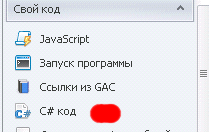
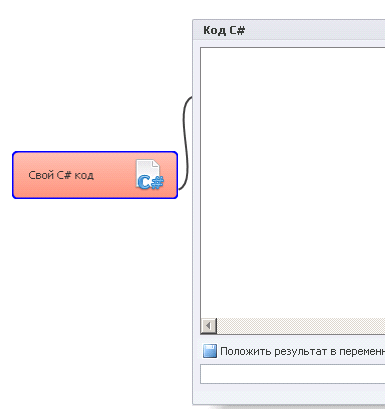
An example of a snippet that came to my attention first:
Often for snippets, you need the latest version of ZennoPoster. Many snippets use methods added in the latest versions. On older versions of ZennoPoster, the snippet may fail.
The method (in C#) is a function or procedure belonging to a class or object. Like procedure in procedural programming, the method consists of a number of operators for performing some action and has a set of input arguments
In simple words, this is a certain command for an object, often with specifying parameters. An example will be considered below.
Each snippet often consists of 3 things:
1. Set value to variables
2. Perform methods on these variables or other objects
3. Show the obtained result after processing by methods
This is not an obligatory sequence, and especially not necessarily the constituent parts.
In C# code, everything after // and before a line break is ignored, i.e. after the characters // as a rule write explanations to a line of code.
If you make a mistake in the snippet, ZennoPoster will tell you the number of the line in the logs and where this error occurred.
About variables:
-Variables inside a snippet, separate from the variables inside our template. They can be connected in some way, but this is not the same thing.
-Variables in C# are of different types. (it is the basics of C#, just google for understanding: "Types of variables (data) in C#"). Some methods work only with variable numbers, others with text, etc.
It's not like in the standard blocks of the template, where we set a variable to anything.
Here is an example of set variables in a snippet with comments to them:
About methods:
We have understood the methods above.
The method can interact with a variable, or it can interact with any other object.
For example here such line clears cookies of instance:
And such, will break a line on a separator |
Only certain methods can be used for each kind of object. Clean the cookies for a variable or try to break an instance can not.)
How to correctly write a method and what it can be applied is always written to the description of the method, that in the method in which sequence should it stand. simply put, you take a sample from the instruction and set your values. Nothing complicated.
ZennoPoster methods are posted here - http://zennolab.com/wiki/en:zennoposter:macros-documentation. Choose your version of Zenno.
Output of result C# of the step:
In the value of the veriable made by the C# step, the default text is "OK", but if there is a line in the snippet code:
Where [...] can be a variable, a text, etc., example (return name; or return "finish"
Then the value of the variable of C# step will be equal to the value of what is specified in the return string.
On the introduction to the basics that's all. Next, you need to look a little and get a grasp of the finished snippets and comments to them.
* Section of snippets on the forum, here you can to find ready-made snippets and ask questions - http://zennolab.com/discussion/forums/snippets.143/
In my experience I would say that in 95% of cases already on the forum (russian part of forum) there are ready-made solutions for the necessary tasks in the snippets section, you just need to find them and maybe just tweak or combine with something.
Officially nobody must write a snippet at the request, even if you have a pro version of ZennoPoster. This is not part of the support area, but if the question is correctly formulated, then the question is unlikely to be ignored by the Zenno community.
P.S. I'm not a C# coder, if I wrote it somewhere incorrectly, then please inform me in the subject.)
But for quickly and conveniently solution untipical parts we can use C#.
Spend an hour of time and you will already start to understand basics in snippets and how to write your first C# snippet.
C# (pronounced "c sharp") is a general-purpose, object-oriented programming language.
Read more - https://en.wikipedia.org/wiki/C_Sharp_(programming_language)
We are not going to learn C# now, but we will only analyze how to use and slightly edit ready-made code sections that will replace/supplement our code with cubes.
Snippet (in programming) - a small piece of source code or text, suitable for reuse. Mean a separate piece of code that can be used separately.
In our case, this is a piece of code that will replace 1 or more ordinary Zenno-cubes
Step snippet in the project:
An example of a snippet that came to my attention first:
C#:
String acc_full = project.Variables ["account_source"]. Value;
Var account = acc_full.Split ('|'). ToList ();
Project.Variables ["login"]. Value = account [0];
Project.Variables ["pass"]. Value = account [1];
Project.Variables ["hz"]. Value = account [2];
Often for snippets, you need the latest version of ZennoPoster. Many snippets use methods added in the latest versions. On older versions of ZennoPoster, the snippet may fail.
The method (in C#) is a function or procedure belonging to a class or object. Like procedure in procedural programming, the method consists of a number of operators for performing some action and has a set of input arguments
In simple words, this is a certain command for an object, often with specifying parameters. An example will be considered below.
Each snippet often consists of 3 things:
1. Set value to variables
2. Perform methods on these variables or other objects
3. Show the obtained result after processing by methods
This is not an obligatory sequence, and especially not necessarily the constituent parts.
In C# code, everything after // and before a line break is ignored, i.e. after the characters // as a rule write explanations to a line of code.
If you make a mistake in the snippet, ZennoPoster will tell you the number of the line in the logs and where this error occurred.
About variables:
-Variables inside a snippet, separate from the variables inside our template. They can be connected in some way, but this is not the same thing.
-Variables in C# are of different types. (it is the basics of C#, just google for understanding: "Types of variables (data) in C#"). Some methods work only with variable numbers, others with text, etc.
It's not like in the standard blocks of the template, where we set a variable to anything.
Here is an example of set variables in a snippet with comments to them:
C#:
Var list = project.Lists ["BlackList"]; //project.Lists["BlackList "]; - In this format, we write our usual list in the project named "BlackList", i.e. In this line C# variable of type "var" with the name "list" we set the value of our list with the name "BlackList".
String id = project.Variables ["it"]. Value; // here we use the C# variable of type string and the name "id" to set a value to our variable from the project named "it".
Project.Variables ["text"]. Value = "LightWood writes templates to order and advises on ZennoPoster"; // Here, we set the text specified in quotes from the inside of the C# code to the project variable. You can also set the value of the C# variable or the result of the method execution, but in these cases, you no longer need to use quotes. The abundance of examples of ready-made snippets on the forum will help to understand)
About methods:
We have understood the methods above.
The method can interact with a variable, or it can interact with any other object.
For example here such line clears cookies of instance:
C#:
Instance.ClearCookie ();
C#:
String acc_full = project.Variables ["account_source"]. Value;
Var account = acc_full.Split ('|'). ToList (); // Split ('|'). ToList (); - this is the method of separationHow to correctly write a method and what it can be applied is always written to the description of the method, that in the method in which sequence should it stand. simply put, you take a sample from the instruction and set your values. Nothing complicated.
ZennoPoster methods are posted here - http://zennolab.com/wiki/en:zennoposter:macros-documentation. Choose your version of Zenno.
Output of result C# of the step:
In the value of the veriable made by the C# step, the default text is "OK", but if there is a line in the snippet code:
C#:
Return [...];Then the value of the variable of C# step will be equal to the value of what is specified in the return string.
On the introduction to the basics that's all. Next, you need to look a little and get a grasp of the finished snippets and comments to them.
* Section of snippets on the forum, here you can to find ready-made snippets and ask questions - http://zennolab.com/discussion/forums/snippets.143/
In my experience I would say that in 95% of cases already on the forum (russian part of forum) there are ready-made solutions for the necessary tasks in the snippets section, you just need to find them and maybe just tweak or combine with something.
Officially nobody must write a snippet at the request, even if you have a pro version of ZennoPoster. This is not part of the support area, but if the question is correctly formulated, then the question is unlikely to be ignored by the Zenno community.
P.S. I'm not a C# coder, if I wrote it somewhere incorrectly, then please inform me in the subject.)
Последнее редактирование:


