ZennoDroid leaks WebRTC (Public IP) with proxy

  • Автор темы Автор темы tharrkun
  • Дата начала Дата начала

tharrkun

Client
Регистрация
05.09.2016
Сообщения
67
Реакции
8
Баллы
8
Hi,
been using mobile proxy for my projects and yesterday decided to take ZennoDroid for a test. I've set up the Memu Android 9 VM and set proxy to the ones I use in ZP. Unfortunately I don't see WebRTC emulation in Android settings and there's the problem.

Pixelscan shows my Public IP as not the same as mobile proxy IP. How do I stop the WebRTC leak?

When I tried disabling Proxified and enabled RedSocks with default settings I keep getting "Executing action Change device proxyof Can't check rules".

This leak makes ZD pretty much useless for me since every website I want to use with it has some kind of security measures...
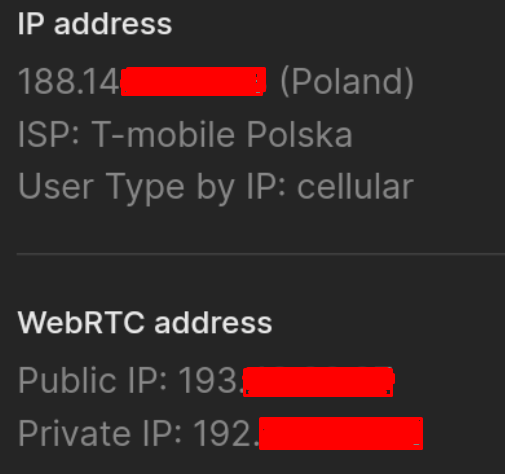
109750
 
Последнее редактирование:
Hi,
been using mobile proxy for my projects and yesterday decided to take ZennoDroid for a test. I've set up the Memu Android 9 VM and set proxy to the ones I use in ZP. Unfortunately I don't see WebRTC emulation in Android settings and there's the problem.

Pixelscan shows my Public IP as not the same as mobile proxy IP. How do I stop the WebRTC leak?

When I tried disabling Proxified and enabled RedSocks with default settings I keep getting "Executing action Change device proxyof Can't check rules".

This leak makes ZD pretty much useless for me since every website I want to use with it has some kind of security measures...

Посмотреть вложение 109750
You should stop VM to switch from Proxifier to Redsocks. Probably didn't make it.
 
Apparently Redsocks only works with IP:port. My mobile proxies are domain:port, so that takes Redsocks out of the picture. Is there anything else I can do to stop the WebRTC from leaking?
Unfortunately, only IP:port will work.
To block Webrtc leak, try following these instructions:
Enable hidden settings in %appdata%\ZennoLab\ZennoDroid\2\Settings the file globalsettings.settings.json
{
"clnMainGroup": "ZennoPoster",
"clnSubGroup": "Droid",
"clnName": "IsTestSettingsVisible",
"clnType": "System.Boolean",
"clnValue": "True"
},
Then follow the steps from this video: https://www.dropbox.com/s/k7q4n6ogj3fogms/WebRTC.mp4?dl=0
tcpdump analyzer: https://www.dropbox.com/s/bujwouco7iduo8z/tcpdump-all.zip?dl=0
commands used in video
adb -s 127.0.0.1:21903 push tcpdump-x86_64 /data/local/tmp/tcpdump
adb -s 127.0.0.1:21903 shell "chmod +x /data/local/tmp/tcpdump
adb -s 127.0.0.1:21903 shell /data/local/tmp/tcpdump -i wlan0 -s 40 -c 1 -nn dst port 19302
 
Or there is another way to block webrtc leak.
You should execute this adb command after installing proxy.
Код:
Развернуть Свернуть Копировать
iptables -A OUTPUT -p udp --dport 3478
 
@VladZen do those two methods work with Memu and with domain:port proxies? I've tested the 2nd method and Pixelscan still shows that my public IP leaked.
 
@VladZen Yes, it was performed on a new VM and I made sure Chrome was not running before. Here's a screenshot:

109829
 
@VladZen I'm afraid I can't do that. I get "Device stopped" error if I try to run the adb command:
109856
 
  • Спасибо
Реакции: tharrkun

Кто просматривает тему: (Всего: 0, Пользователи: 0, Гости: 0)