Вы используете устаревший браузер. Этот и другие сайты могут отображаться в нём некорректно.
Вам необходимо обновить браузер или попробовать использовать другой.
Вам необходимо обновить браузер или попробовать использовать другой.
How to emulate right click + open page in new tab
- Автор темы zenfreak
- Дата начала

- Регистрация
- 21.08.2013
- Сообщения
- 249
- Реакции
- 12
- Баллы
- 18
C'mon guy .. there must be a way - this is a simple task to accomplish. I need that the website will see that I have clicked the link and opened the page in a different tab.
Please note that the website in question tracks the mouse movements and click as it has attributes such as mouseenter and mouseleave so it's imperative that I look as natural as I can.
Give me something to start with as the _blank attribute doesn't work, maybe I need a different approach.
Please note that the website in question tracks the mouse movements and click as it has attributes such as mouseenter and mouseleave so it's imperative that I look as natural as I can.
Give me something to start with as the _blank attribute doesn't work, maybe I need a different approach.
- Регистрация
- 21.08.2013
- Сообщения
- 249
- Реакции
- 12
- Баллы
- 18
Let's take this link for example: https://plus.google.com/communities/100481850057867813346. If you add target="_blank" to any a tag it will open in a new window as it should BUT if you add the _blank attribute to the a tag of a profile link such as ./106189944370624200140 it will open the new link in the same tab.
Live example:
Live example:
HTML:
<a jscontroller="I190Fe" jsaction="click:Cw5dae(preventDefault=true); mouseenter:d1MnZc; mouseleave:bubzGf" jslog="10937; 6:106189944370624200140; track: click" data-profileid="106189944370624200140" class="m3JvWd" href="./106189944370624200140" id="ow1927" __is_owner="true" target="_blank" data-focusid="1927">Manu H.</a>
PHaRTnONu
Client
- Регистрация
- 01.10.2016
- Сообщения
- 340
- Реакции
- 48
- Баллы
- 28
wont inserting the rest of the html herf into the url automaticly open a new window?
heres a proof of concept and a screen shot. thats basic html a backslash will always stay in wondow a full url will force a new one


heres a proof of concept and a screen shot. thats basic html a backslash will always stay in wondow a full url will force a new one
Код:
<a jscontroller="I190Fe" jsaction="click:Cw5dae(preventDefault=true); mouseenter:d1MnZc; mouseleave:bubzGf" jslog="10937; 6:106189944370624200140; track: click" data-profileid="106189944370624200140" class="m3JvWd" href="https://plus.google.com/communities/106189944370624200140" id="ow1927" __is_owner="true" target="_blank" data-focusid="1927">Manu H.</a>Вложения
- Регистрация
- 21.08.2013
- Сообщения
- 249
- Реакции
- 12
- Баллы
- 18
- Регистрация
- 21.08.2013
- Сообщения
- 249
- Реакции
- 12
- Баллы
- 18
True, but changing the controller scripting is just not worth it - or at least not for me having no experience with js scripting.
On the other hand, when I CTRL + Click the link from my browser, it opens normally in a new tag and this is what I was trying to emulate with zenno. This should be a simple task and if it's not currently possible I think it should be implemented soon. If everyone agrees I will open a new request for this.
On the other hand, when I CTRL + Click the link from my browser, it opens normally in a new tag and this is what I was trying to emulate with zenno. This should be a simple task and if it's not currently possible I think it should be implemented soon. If everyone agrees I will open a new request for this.
- Регистрация
- 21.08.2013
- Сообщения
- 249
- Реакции
- 12
- Баллы
- 18
@PHaRTnONu I think this is the link you were talking about https://help.zennolab.com/en/v5/zennoposter/5.10.1/webframe.html#topic376.html but I don't see how can you emulate a CTRL+click using a KeyEvent
PHaRTnONu
Client
- Регистрация
- 01.10.2016
- Сообщения
- 340
- Реакции
- 48
- Баллы
- 28
ok did some digging....
first make sure this is not relevant LINK
tthis is a cntl left click but zenno will not do it no matter what..... IDK what to tell you. here... mabytry a sendkey emulations
first make sure this is not relevant LINK
Код:
instance.ActiveTab.KeyEvent("LeftCtrl", "down", "Ctrl");
instance.ActiveTab.MouseClick(60, 200, "left", "click");
zortexx
Client
- Регистрация
- 19.09.2011
- Сообщения
- 2 520
- Реакции
- 1 228
- Баллы
- 113
Browser in ZennoPoster is not a regular browser.
If right mouse click is needed to trick some botguard or something like this you can add a rightclick on the link. But browser in Zenno does not open a new tab by rightclick. For this you should use Actions sequence.
You can try to rightclick on the white field in extended editor in Project Maker and follow like this by analogue:
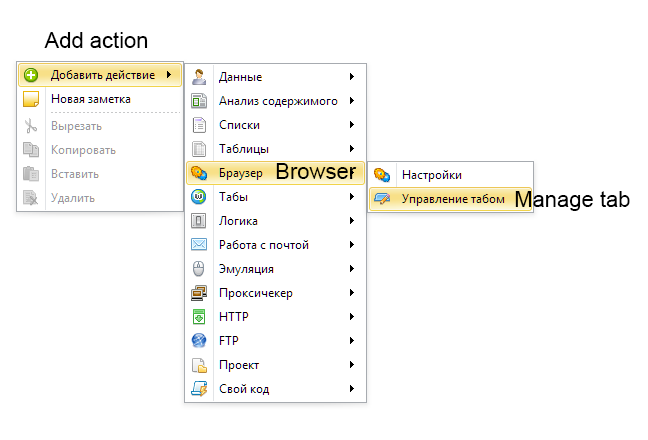
It is necessary to take two steps consistently to open new tab:
1.
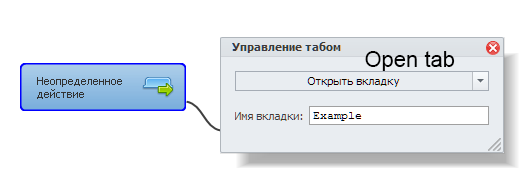 2.
2.
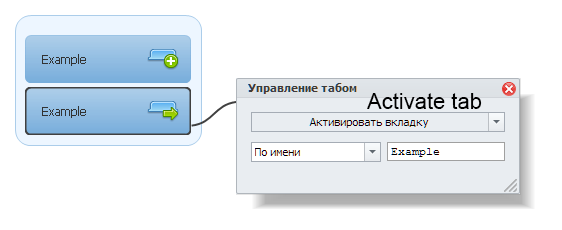
After that it is possible to do some actions in this tab like navigate and so on.
PS.: Do not forget to close used tabs to save memory.
If right mouse click is needed to trick some botguard or something like this you can add a rightclick on the link. But browser in Zenno does not open a new tab by rightclick. For this you should use Actions sequence.
You can try to rightclick on the white field in extended editor in Project Maker and follow like this by analogue:
It is necessary to take two steps consistently to open new tab:
1.
After that it is possible to do some actions in this tab like navigate and so on.
PS.: Do not forget to close used tabs to save memory.
PHaRTnONu
Client
- Регистрация
- 01.10.2016
- Сообщения
- 340
- Реакции
- 48
- Баллы
- 28
ok.... confirmed this code is not working right on this site
https://javascript.info/mouse-events-basics
the key event is not going foward even though dark driver said we can use https://msdn.microsoft.com/en-us/library/system.windows.input.key.aspx
keys.... so im confused on how to have it cntl depresed before a mouse event....
ill look more tomarrow....
https://javascript.info/mouse-events-basics
the key event is not going foward even though dark driver said we can use https://msdn.microsoft.com/en-us/library/system.windows.input.key.aspx
keys.... so im confused on how to have it cntl depresed before a mouse event....
ill look more tomarrow....
- Регистрация
- 21.08.2013
- Сообщения
- 249
- Реакции
- 12
- Баллы
- 18
Browser in ZennoPoster is not a regular browser.
If right mouse click is needed to trick some botguard or something like this you can add a rightclick on the link. But browser in Zenno does not open a new tab by rightclick. For this you should use Actions sequence.
You can try to rightclick on the white field in extended editor in Project Maker and follow like this by analogue:
What do you mean by you can add a rightclick on the link? If you mean adding target="_blank", that was already been discussed and it doesn't work
you should use Actions sequence I don't get what you tried to explain here - you just showed how to add and activate a new tab and I don't see how this helps with clicking on a link and opening a new tab. Just to make sure, I tried opening a new tab and adding the target="_blank" attribute and see if it will open in the new opened tab - still doesn't work. Even if I appreciate your answer it doesn;t make sense at all.
@PHaRTnONu Yes, indeed that code doesn;t work and I'm out of ideas on how to do this. Moreover, I can't emulate the BACK browser button either and this makes my work even harder. (The solution here: http://zennolab.com/discussion/threads/browser-back-button.2177/#post-76514 doesn;t wok either)


lokiys
Moderator
- Регистрация
- 01.02.2012
- Сообщения
- 4 922
- Реакции
- 1 206
- Баллы
- 113
Hi.
1. Scrape URL from page You want to go
2. Open new tab
3. Activate new tab
4. Navigate to previously scrapped URL
This is how you do such action in ZennoBrowser.
This method is for IE browser if I'm not mistaken: instance.ActiveTab.Handle,System.Windows.Forms.Keys.BrowserBack
1. Scrape URL from page You want to go
2. Open new tab
3. Activate new tab
4. Navigate to previously scrapped URL
This is how you do such action in ZennoBrowser.
This method is for IE browser if I'm not mistaken: instance.ActiveTab.Handle,System.Windows.Forms.Keys.BrowserBack
PHaRTnONu
Client
- Регистрация
- 01.10.2016
- Сообщения
- 340
- Реакции
- 48
- Баллы
- 28
No it's enabled in zenno and it's a keyboard shortcut. There is a 0x key assigned for it in Windows systems. Also I checked firfox and chrome support the buttonThis method is for IE browser if I'm not mistaken: instance.ActiveTab.Handle,System.Windows.Forms.Keys.BrowserBack
Кто просматривает тему: (Всего: 0, Пользователи: 0, Гости: 0)
Поделиться: