ZennoPoster get's detected instantly

  • Автор темы Автор темы megasushi
  • Дата начала Дата начала

megasushi

Новичок
Регистрация
30.07.2020
Сообщения
4
Реакции
0
Баллы
1
Hi,

when I open https://registrierung.gmx.net/#.pc_page.tarifvergleich.index.teaser_1ucleanpbtn.registrierung in a normal browser, it opens the sign up page.
However, when I open the url via ZennoPoster 7, the website seems to detect that it is not a real browser and the website just shows this error message:
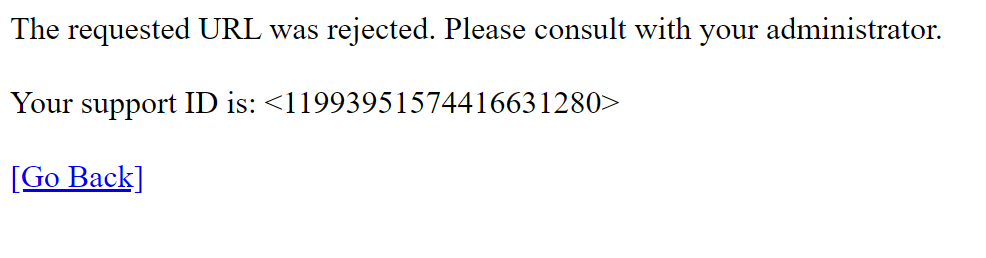
60819


This only happens in ZennoPoster. In ProjectMaker it works most of the time. In a real browser it works 100%.

My Settings:
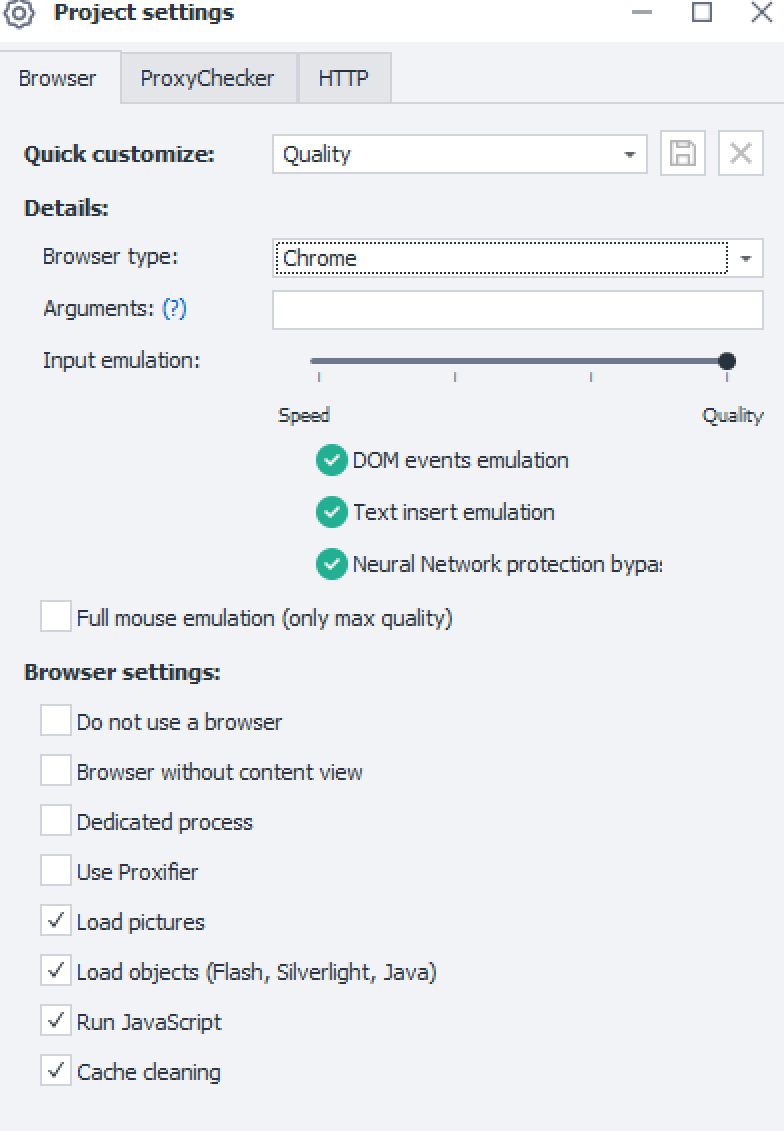
60821


60824
 

Вложения

  • Unbenannt.png
    Unbenannt.png
    27,1 KB · Просмотры: 249
Try to set the following browser settings in zenno. That worked for me..
Anonimity_1.pngAnonimity_2.png
 
  • Оценить
Реакции: megasushi
having the same issue since days and tried your settings but i have still the exact same issue
(for some reason i dont have the full mouse emulation)

60910
60911
60912
 
  • Оценить
Реакции: megasushi
Any idea why it's not working or any solution for the problem?
 
gmx detect proxies, probably in ZennoPoster you using proxies, and in project maker not ? I try several sources and allways detect, only Proxybonanca is fine, but their proxies are expensive. Maybe you can try with mobile option
 
having the same issue since days and tried your settings but i have still the exact same issue
(for some reason i dont have the full mouse emulation)

Посмотреть вложение 60910Посмотреть вложение 60911Посмотреть вложение 60912
You should probably give it more tries.
Please use attached template. Restart the project again if does not open the page from the first time.
 

Вложения

I always run my profiles for testing at project maker and I'm not using any proxy currently. In my normal browser I don't have any issues using that site with project maker I can't even get to the register page manually

Edit: I will try the template later thanks so far
 
you run ZennoPoster registration on gmx without proxies ?
 
you run ZennoPoster registration on gmx without proxies ?

When I'm creating projects I'm using the project maker as long as there could be issues or anything. I'm just using zennoppster if projects are 100% done and clear of issues. And for testing I'm rarely using proxies only if they are needed for final results/tests
 
When I'm creating projects I'm using the project maker as long as there could be issues or anything. I'm just using zennoppster if projects are 100% done and clear of issues. And for testing I'm rarely using proxies only if they are needed for final results/tests

It seems that this is not a problem of ZennoPoster but that you don't use proxies...

I'm creating gmx-accounts with Zenno without any problems.
 
Guys, gmx is working with at least FireFox52x64 bit browser in zenno currently.
 
When I'm creating projects I'm using the project maker as long as there could be issues or anything. I'm just using zennoppster if projects are 100% done and clear of issues. And for testing I'm rarely using proxies only if they are needed for final results/tests

Ok, it means, you tested on project maker and on zennoposter without proxies right ? and on test, on project maker was all fine, but on zennoposter you get error ? on test, on zennoposter you runs only once time template ?
 
I now testing posting on Pornhub, on this website I had in past ghost posting, my videos not show up. What i change? First, change whole template to mobile, added great swipe and touch option, arrive on website from google, naturally ( not via referal fake option) , then user scrolling and watching videos, my cookies are very nice and naturally. And for now, all is fine....but we will see .
 
Ok, it means, you tested on project maker and on zennoposter without proxies right ? and on test, on project maker was all fine, but on zennoposter you get error ? on test, on zennoposter you runs only once time template ?

No. im still at the part of creating the project without using any proxies.
but the point is!!!!!
i can open Chrome (on my desktop) and navigate it to the gmx registration website manual and register as well
BUT
i cant! open gmx at project maker manual/or automated without beeing detected
im not using any proxy so far!

i try to make a fresh install of zennoposter maybe it will help
 
I tried a complete new fresh installation of the 7.xx version the issue is still there and like I said manual navigation to GMX in my desktop chrome is working flawless just with project maker not
 
I tried a complete new fresh installation of the 7.xx version the issue is still there and like I said manual navigation to GMX in my desktop chrome is working flawless just with project maker not
It seems you don't want to follow my advice....
Yes, there is the problem with Chrome in zennoposter on gmx and I already reported it to developers.
Meanwhile, please use FireFox52x64 bit browser with gmx. It worked by my tests, I even attached the template for you.
 
Im using your suggested settings as you can see on my posted screenshots above but it doesn't make any difference. Also after restarting project maker
 
Im using your suggested settings as you can see on my posted screenshots above but it doesn't make any difference. Also after restarting project maker
Do you have latest version 5.45? I tested in that version and it worked normally with gmx in FireFox.
Simetimes it still may give the above error, but mainly it allows to open registration page.
 
i think pictures will tell you more than my words....
i tried now 5.45 and the actual 7.xx version both with the same results and same settings.
as you can see on the pictures im using your suggested settings BUT i noticed at my Browser screen thats hes not changing the Chrome browser to firefox even i safed it and restarted the program! (look at the pictures)

settings
61235


Chrome Browser is used even Firefox is safed and should be used:
61237


thanks for your help
 
i think pictures will tell you more than my words....
i tried now 5.45 and the actual 7.xx version both with the same results and same settings.
as you can see on the pictures im using your suggested settings BUT i noticed at my Browser screen thats hes not changing the Chrome browser to firefox even i safed it and restarted the program! (look at the pictures)

settings
Посмотреть вложение 61235

Chrome Browser is used even Firefox is safed and should be used:
Посмотреть вложение 61237

thanks for your help
After selecting FIreFox52x64xbit browser in project settings, you should restart your project to apply settings (with Restart button or F5). That's why you still have Chrome in PM and getting this error.
 
Sometimes it's still messing up but I would say like 70-80% of my runs it's working

Big thanks for the help and sorry for my misunderstanding
 
  • Оценить
Реакции: VladZen
Workaroud is to switch to FireFox52x64 bit browser engine

I'm working on another server with Zenno v 7.1.2.1 and therewith gmx loads without any problems with Chrome engine. After that tried it on our main server with v 7.1.6.0 and get the "The requested URL was rejected. Please consult with your administrator." error. So the problem with loading gmx with Chrome is only in the latest versions of ZP!
 
Hi,

when I open https://registrierung.gmx.net/#.pc_page.tarifvergleich.index.teaser_1ucleanpbtn.registrierung in a normal browser, it opens the sign up page.
However, when I open the url via ZennoPoster 7, the website seems to detect that it is not a real browser and the website just shows this error message:
Посмотреть вложение 60819

This only happens in ZennoPoster. In ProjectMaker it works most of the time. In a real browser it works 100%.

My Settings:
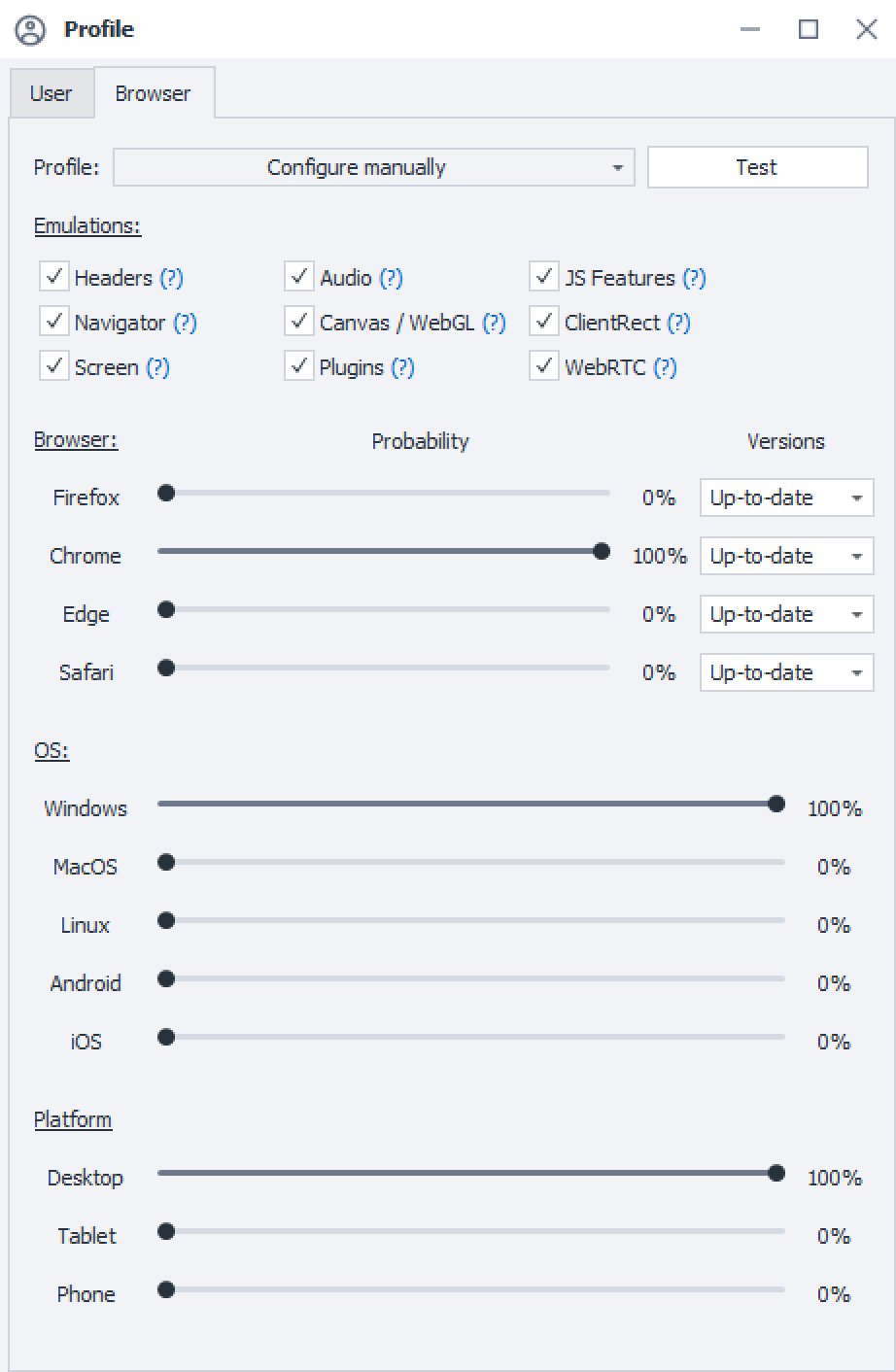
Посмотреть вложение 60821

Посмотреть вложение 60824


With this setup, everything works


61809


Everything works on version 5 with the same settings
 
Последнее редактирование:
  • Оценить
Реакции: morpheus93

Кто просматривает тему: (Всего: 0, Пользователи: 0, Гости: 0)